
5DAYS opens its MCP: connect your AI to your team's memory
Spark AI already does a very good job of answering questions about what lives in 5DAYS: a decision made in a meeting, what a document says, where a task stands. But answering a question isn’t always what you need. Sometimes you want that knowledge to become something else — a process, a design, a project plan, a report for a client.
That’s exactly what the MCP we’re launching today makes possible.
What is the 5DAYS MCP?
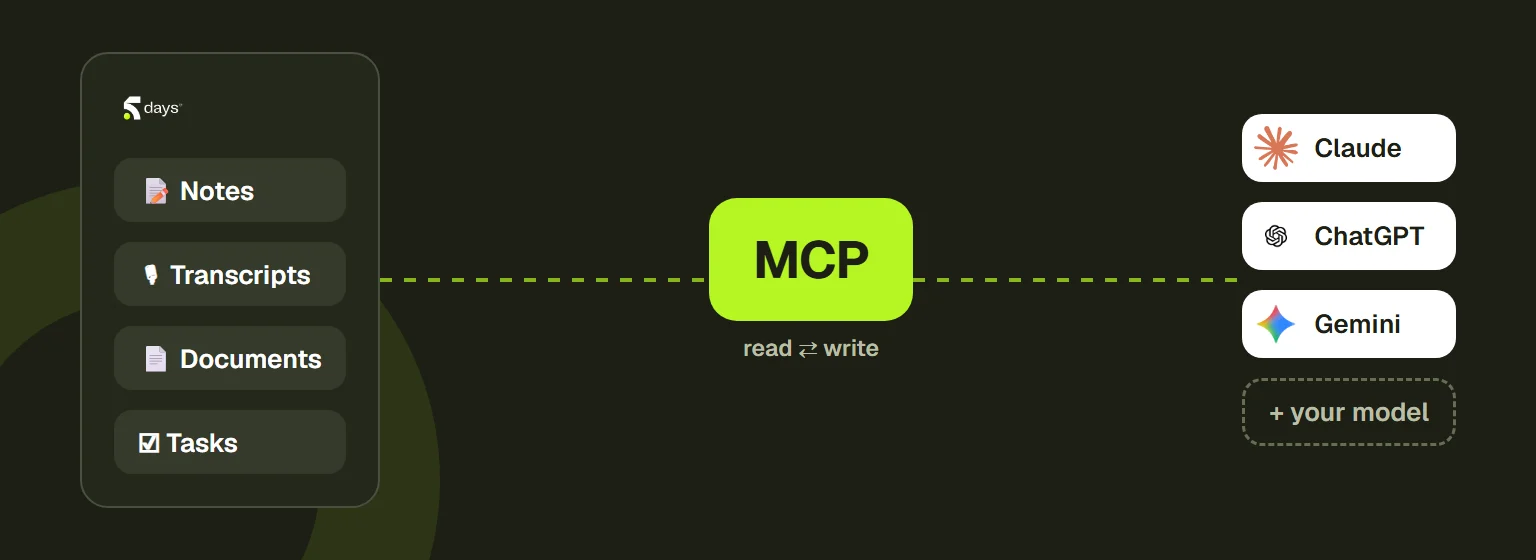
The Model Context Protocol (MCP) is an open standard that lets an AI model — the one you use, Claude or any other — connect directly to a data source. With the 5DAYS MCP, your model can now query, and also write to, all the knowledge stored in your 5DAYS workspace:
- Notes — read and create
- Meeting transcripts — full read access, search
- Documents — read and edit
- Tasks — read, create, update
In other words, everything your team has decided, discussed or documented becomes usable by the model of your choice, inside your own workflow.
Spark AI answers, the MCP transforms
The two don’t replace each other — they complement each other:
- Spark AI is the assistant built into 5DAYS, optimized to answer questions about your existing knowledge quickly and accurately — “What did we agree with this client in March?”, “Where is project X at?”
- The MCP opens that same knowledge to uses Spark AI doesn’t cover: drafting a specification from three months of meetings, producing a mockup from client feedback scattered across twenty notes, turning the tasks piled up in a project into a structured process.
The MCP turns a team’s memory into raw material for building something new.
Why it matters
Most AI tools hit the same wall: they’re excellent with the knowledge you hand them directly, and very poor at fetching the knowledge scattered across a company’s tools. The MCP flips that around. Your AI model no longer needs context pasted into it — it goes and gets it, at the source, with the permissions you define.
And because sovereignty remains our priority, you stay in control of the model: your own, the one you already run, or Spark AI. Your data doesn’t leave the boundaries you’ve set.
Who is it for?
This launch is aimed in particular at technical teams and organizations that already use an AI model in their own tools and want to connect it to the knowledge built up in 5DAYS, rather than duplicate that knowledge somewhere else.